
#简介
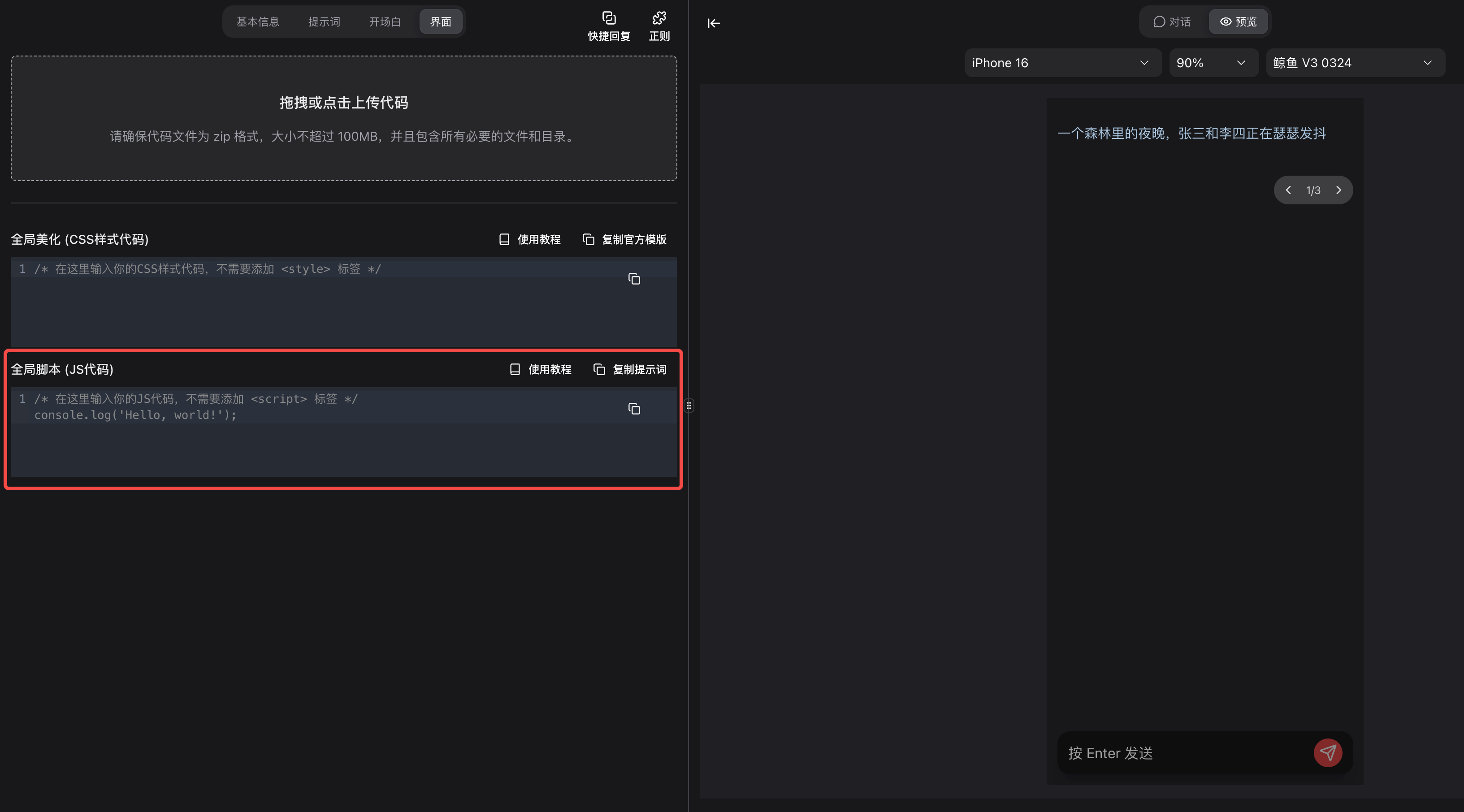
支持将自定义脚本插入官方Chat。可以在如图所示的地方输入并编辑你的脚本。编辑完成后,记得点击刷新才能看到效果。
#代码示例
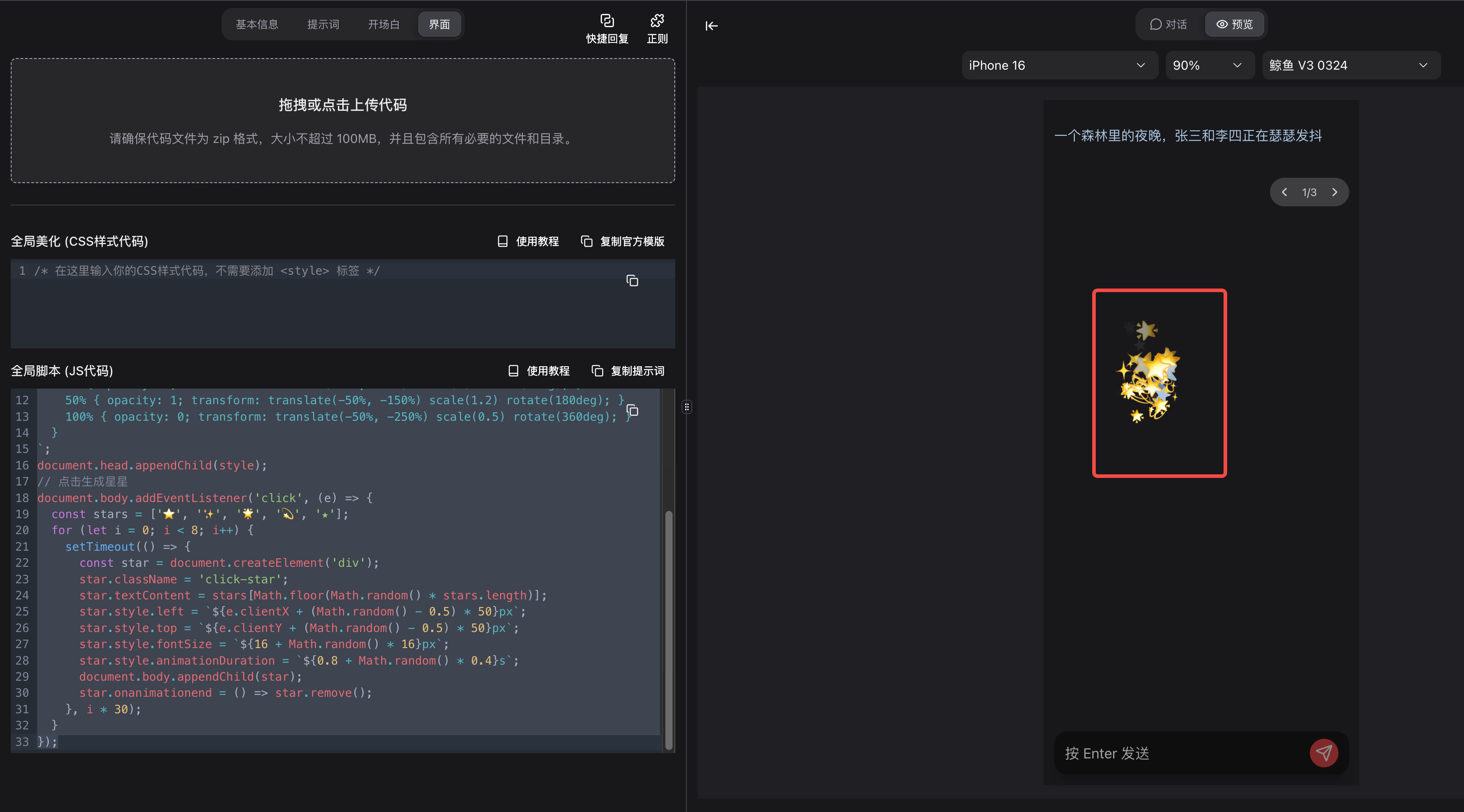
#示例1:在鼠标点击位置生成星星特效
// 添加样式
const style = document.createElement('style');
style.textContent = `
  .click-star {
    position: fixed;
    pointer-events: none;
    font-size: 20px;
    z-index: 9999;
    animation: clickStarFloat 1s ease-out forwards;
  }
  @keyframes clickStarFloat {
    0% { opacity: 1; transform: translate(-50%, -50%) scale(0) rotate(0deg); }
    50% { opacity: 1; transform: translate(-50%, -150%) scale(1.2) rotate(180deg); }
    100% { opacity: 0; transform: translate(-50%, -250%) scale(0.5) rotate(360deg); }
  }
`;
document.head.appendChild(style);
// 点击生成星星
document.body.addEventListener('click', (e) => {
  const stars = ['⭐', '✨', '🌟', '💫', '★'];
  for (let i = 0; i < 8; i++) {
    setTimeout(() => {
      const star = document.createElement('div');
      star.className = 'click-star';
      star.textContent = stars[Math.floor(Math.random() * stars.length)];
      star.style.left = `${e.clientX + (Math.random() - 0.5) * 50}px`;
      star.style.top = `${e.clientY + (Math.random() - 0.5) * 50}px`;
      star.style.fontSize = `${16 + Math.random() * 16}px`;
      star.style.animationDuration = `${0.8 + Math.random() * 0.4}s`;
      document.body.appendChild(star);
      star.onanimationend = () => star.remove();
    }, i * 30);
  }
});
#示例2:小桌宠
(function() {
  // ==================== 创建样式 ====================
  const style = document.createElement('style');
  style.textContent = `
    /* 宠物容器 */
    #pet-container {
      position: fixed;
      bottom: 20px;
      right: 100px;
      z-index: 99999;
      cursor: grab;
      user-select: none;
      transition: filter 0.3s;
    }
    #pet-container:active {
      cursor: grabbing;
    }
    #pet-container:hover {
      filter: brightness(1.1);
    }

    /* 小猫身体 */
    .pet-cat {
      position: relative;
      width: 80px;
      height: 70px;
    }

    /* 身体 */
    .cat-body {
      position: absolute;
      bottom: 0;
      left: 50%;
      transform: translateX(-50%);
      width: 60px;
      height: 45px;
      background: linear-gradient(135deg, #4a4a4a 0%, #3a3a3a 100%);
      border-radius: 50% 50% 45% 45%;
      animation: bodyBounce 1s ease-in-out infinite;
    }

    /* 头部 */
    .cat-head {
      position: absolute;
      top: 0;
      left: 50%;
      transform: translateX(-50%);
      width: 50px;
      height: 42px;
      background: linear-gradient(135deg, #5a5a5a 0%, #4a4a4a 100%);
      border-radius: 50% 50% 45% 45%;
      z-index: 2;
      animation: headTilt 3s ease-in-out infinite;
    }

    /* 耳朵 */
    .cat-ear {
      position: absolute;
      top: -8px;
      width: 18px;
      height: 20px;
      background: linear-gradient(135deg, #5a5a5a 0%, #4a4a4a 100%);
      border-radius: 50% 50% 0 0;
    }
    .cat-ear.left {
      left: 2px;
      transform: rotate(-15deg);
    }
    .cat-ear.right {
      right: 2px;
      transform: rotate(15deg);
    }
    .cat-ear-inner {
      position: absolute;
      top: 4px;
      left: 50%;
      transform: translateX(-50%);
      width: 10px;
      height: 10px;
      background: #ffb6c1;
      border-radius: 50% 50% 0 0;
    }

    /* 眼睛 */
    .cat-eyes {
      position: absolute;
      top: 14px;
      left: 50%;
      transform: translateX(-50%);
      display: flex;
      gap: 12px;
    }
    .cat-eye {
      width: 12px;
      height: 12px;
      background: #fff;
      border-radius: 50%;
      position: relative;
      overflow: hidden;
    }
    .cat-pupil {
      position: absolute;
      width: 8px;
      height: 8px;
      background: #222;
      border-radius: 50%;
      top: 2px;
      left: 2px;
      animation: lookAround 4s ease-in-out infinite;
    }
    .cat-pupil::after {
      content: '';
      position: absolute;
      width: 3px;
      height: 3px;
      background: #fff;
      border-radius: 50%;
      top: 1px;
      left: 1px;
    }

    /* 眨眼动画 */
    .cat-eye.blink {
      animation: blink 0.15s ease-in-out;
    }
    @keyframes blink {
      0%, 100% { height: 12px; }
      50% { height: 2px; }
    }

    /* 鼻子 */
    .cat-nose {
      position: absolute;
      top: 24px;
      left: 50%;
      transform: translateX(-50%);
      width: 6px;
      height: 5px;
      background: #ffb6c1;
      border-radius: 50% 50% 40% 40%;
    }

    /* 嘴巴 */
    .cat-mouth {
      position: absolute;
      top: 28px;
      left: 50%;
      transform: translateX(-50%);
      width: 12px;
      height: 6px;
    }
    .cat-mouth::before,
    .cat-mouth::after {
      content: '';
      position: absolute;
      width: 7px;
      height: 5px;
      border: 2px solid #333;
      border-color: transparent transparent #333 transparent;
      border-radius: 0 0 50% 50%;
      top: 0;
    }
    .cat-mouth::before { left: -2px; }
    .cat-mouth::after { right: -2px; }

    /* 胡须 */
    .cat-whiskers {
      position: absolute;
      top: 26px;
      width: 100%;
    }
    .whisker {
      position: absolute;
      width: 18px;
      height: 1px;
      background: #666;
    }
    .whisker.left-1 { left: -5px; top: 0; transform: rotate(-10deg); }
    .whisker.left-2 { left: -7px; top: 5px; transform: rotate(0deg); }
    .whisker.left-3 { left: -5px; top: 10px; transform: rotate(10deg); }
    .whisker.right-1 { right: -5px; top: 0; transform: rotate(10deg); }
    .whisker.right-2 { right: -7px; top: 5px; transform: rotate(0deg); }
    .whisker.right-3 { right: -5px; top: 10px; transform: rotate(-10deg); }

    /* 腿 */
    .cat-legs {
      position: absolute;
      bottom: -5px;
      left: 50%;
      transform: translateX(-50%);
      display: flex;
      gap: 20px;
    }
    .cat-leg {
      width: 12px;
      height: 15px;
      background: linear-gradient(135deg, #4a4a4a 0%, #3a3a3a 100%);
      border-radius: 0 0 6px 6px;
    }

    /* 尾巴 */
    .cat-tail {
      position: absolute;
      bottom: 10px;
      right: -15px;
      width: 8px;
      height: 35px;
      background: linear-gradient(to top, #4a4a4a 0%, #3a3a3a 100%);
      border-radius: 4px 4px 4px 50%;
      transform-origin: bottom center;
      animation: tailWag 0.8s ease-in-out infinite;
    }

    /* 对话气泡 */
    .pet-bubble {
      position: absolute;
      bottom: 100%;
      left: 50%;
      transform: translateX(-50%);
      background: #fff;
      padding: 8px 12px;
      border-radius: 15px;
      font-size: 12px;
      white-space: nowrap;
      box-shadow: 0 2px 10px rgba(0,0,0,0.1);
      opacity: 0;
      transition: opacity 0.3s, transform 0.3s;
      pointer-events: none;
      font-family: 'Segoe UI', sans-serif;
    }
    .pet-bubble.show {
      opacity: 1;
      transform: translateX(-50%) translateY(-10px);
    }
    .pet-bubble::after {
      content: '';
      position: absolute;
      bottom: -6px;
      left: 50%;
      transform: translateX(-50%);
      border: 6px solid transparent;
      border-top-color: #fff;
      border-bottom: none;
    }

    /* 状态指示 */
    .pet-status {
      position: absolute;
      top: -5px;
      right: -5px;
      font-size: 16px;
      animation: statusPop 0.5s ease-out;
    }

    /* 菜单 */
    .pet-menu {
      position: absolute;
      bottom: 100%;
      left: 50%;
      transform: translateX(-50%) translateY(-20px);
      background: #fff;
      border-radius: 12px;
      padding: 8px;
      box-shadow: 0 4px 20px rgba(0,0,0,0.15);
      display: none;
      gap: 5px;
      flex-wrap: wrap;
      width: 120px;
      justify-content: center;
    }
    .pet-menu.show {
      display: flex;
    }
    .pet-menu-btn {
      width: 32px;
      height: 32px;
      border: none;
      background: #f0f0f0;
      border-radius: 8px;
      cursor: pointer;
      font-size: 16px;
      transition: all 0.2s;
    }
    .pet-menu-btn:hover {
      background: #e0e0e0;
      transform: scale(1.1);
    }

    /* 动画 */
    @keyframes bodyBounce {
      0%, 100% { transform: translateX(-50%) scaleY(1); }
      50% { transform: translateX(-50%) scaleY(0.95); }
    }
    @keyframes headTilt {
      0%, 100% { transform: translateX(-50%) rotate(0deg); }
      25% { transform: translateX(-50%) rotate(-3deg); }
      75% { transform: translateX(-50%) rotate(3deg); }
    }
    @keyframes tailWag {
      0%, 100% { transform: rotate(-20deg); }
      50% { transform: rotate(20deg); }
    }
    @keyframes lookAround {
      0%, 100% { transform: translate(0, 0); }
      25% { transform: translate(2px, 0); }
      50% { transform: translate(0, 2px); }
      75% { transform: translate(-2px, 0); }
    }
    @keyframes statusPop {
      0% { transform: scale(0); opacity: 0; }
      50% { transform: scale(1.3); }
      100% { transform: scale(1); opacity: 1; }
    }
    @keyframes sleep {
      0%, 100% { transform: translateX(-50%) scaleY(1); }
      50% { transform: translateX(-50%) scaleY(0.98); }
    }
    @keyframes walk {
      0%, 100% { transform: translateY(0); }
      50% { transform: translateY(-3px); }
    }

    /* 睡觉状态 */
    .pet-cat.sleeping .cat-eye {
      height: 3px !important;
      background: #333;
    }
    .pet-cat.sleeping .cat-pupil {
      display: none;
    }
    .pet-cat.sleeping .cat-body {
      animation: sleep 2s ease-in-out infinite;
    }
    .pet-cat.sleeping .cat-tail {
      animation: none;
      transform: rotate(-10deg);
    }

    /* 开心状态 */
    .pet-cat.happy .cat-eye {
      height: 6px !important;
      border-radius: 6px 6px 0 0;
      background: #333;
    }
    .pet-cat.happy .cat-pupil {
      display: none;
    }
    .pet-cat.happy .cat-tail {
      animation: tailWag 0.3s ease-in-out infinite;
    }

    /* 走路状态 */
    .pet-cat.walking .cat-leg {
      animation: walk 0.2s ease-in-out infinite;
    }
    .pet-cat.walking .cat-leg:nth-child(2) {
      animation-delay: 0.1s;
    }

    /* 爱心特效 */
    .heart {
      position: absolute;
      font-size: 20px;
      animation: floatUp 1s ease-out forwards;
      pointer-events: none;
    }
    @keyframes floatUp {
      0% { opacity: 1; transform: translateY(0) scale(0); }
      50% { opacity: 1; transform: translateY(-20px) scale(1); }
      100% { opacity: 0; transform: translateY(-50px) scale(0.5); }
    }
  `;
  document.head.appendChild(style);

  // ==================== 创建宠物HTML ====================
  const container = document.createElement('div');
  container.id = 'pet-container';
  container.innerHTML = `
    <div class="pet-bubble" id="pet-bubble">你好呀~ 👋</div>
    <div class="pet-status" id="pet-status"></div>
    <div class="pet-menu" id="pet-menu">
      <button class="pet-menu-btn" data-action="feed" title="喂食">🍖</button>
      <button class="pet-menu-btn" data-action="play" title="玩耍">🎾</button>
      <button class="pet-menu-btn" data-action="sleep" title="睡觉">😴</button>
      <button class="pet-menu-btn" data-action="wake" title="叫醒">⏰</button>
      <button class="pet-menu-btn" data-action="pet" title="摸摸">🤚</button>
      <button class="pet-menu-btn" data-action="clean" title="清理">🧹</button>
    </div>
    <div class="pet-cat" id="pet-cat">
      <!-- 尾巴 -->
      <div class="cat-tail"></div>
      <!-- 身体 -->
      <div class="cat-body"></div>
      <!-- 腿 -->
      <div class="cat-legs">
        <div class="cat-leg"></div>
        <div class="cat-leg"></div>
      </div>
      <!-- 头部 -->
      <div class="cat-head">
        <!-- 耳朵 -->
        <div class="cat-ear left"><div class="cat-ear-inner"></div></div>
        <div class="cat-ear right"><div class="cat-ear-inner"></div></div>
        <!-- 眼睛 -->
        <div class="cat-eyes">
          <div class="cat-eye" id="left-eye"><div class="cat-pupil"></div></div>
          <div class="cat-eye" id="right-eye"><div class="cat-pupil"></div></div>
        </div>
        <!-- 鼻子 -->
        <div class="cat-nose"></div>
        <!-- 嘴巴 -->
        <div class="cat-mouth"></div>
        <!-- 胡须 -->
        <div class="cat-whiskers">
          <div class="whisker left-1"></div>
          <div class="whisker left-2"></div>
          <div class="whisker left-3"></div>
          <div class="whisker right-1"></div>
          <div class="whisker right-2"></div>
          <div class="whisker right-3"></div>
        </div>
      </div>
    </div>
  `;
  document.body.appendChild(container);

  // ==================== 获取元素 ====================
  const pet = document.getElementById('pet-cat');
  const bubble = document.getElementById('pet-bubble');
  const status = document.getElementById('pet-status');
  const menu = document.getElementById('pet-menu');
  const leftEye = document.getElementById('left-eye');
  const rightEye = document.getElementById('right-eye');

  // ==================== 状态管理 ====================
  const state = {
    mood: 'normal',       // normal, happy, sleeping, sad
    hunger: 100,          // 饱食度
    happiness: 100,       // 快乐值
    energy: 100,          // 精力值
    isDragging: false,
    isWalking: false,
    walkDirection: 1,
    position: { x: window.innerWidth - 180, y: window.innerHeight - 90 }
  };

  // ==================== 对话内容 ====================
  const dialogues = {
    normal: ['喵~', '在想什么呢?', '今天天气不错~', '有点无聊...', '陪我玩嘛~', '(。・ω・。)'],
    happy: ['好开心喵!', '最喜欢你了!', '嘿嘿嘿~', '٩(◕‿◕。)۶', '幸福喵~'],
    hungry: ['肚子饿了...', '想吃小鱼干', '喵呜...', '给点吃的嘛'],
    sleepy: ['好困...', '想睡觉了', '(´-ω-`)', 'zzZ...'],
    sleeping: ['zzZ...', '呼噜呼噜...', '...喵...'],
    pet: ['咕噜咕噜~', '好舒服喵~', '还要还要!', '(◕ᴗ◕✿)'],
    feed: ['好吃!', '谢谢投喂~', '满足喵!', '还想要!'],
    play: ['接住了!', '好玩!', '再来再来!', '玩累了~']
  };

  // ==================== 工具函数 ====================
  function random(arr) {
    return arr[Math.floor(Math.random() * arr.length)];
  }

  function showBubble(text, duration = 2000) {
    bubble.textContent = text;
    bubble.classList.add('show');
    setTimeout(() => bubble.classList.remove('show'), duration);
  }

  function showStatus(emoji) {
    status.textContent = emoji;
    status.style.animation = 'none';
    status.offsetHeight; // 触发重绘
    status.style.animation = 'statusPop 0.5s ease-out';
    setTimeout(() => status.textContent = '', 1500);
  }

  function createHeart(x, y) {
    const heart = document.createElement('div');
    heart.className = 'heart';
    heart.textContent = '❤️';
    heart.style.left = x + 'px';
    heart.style.top = y + 'px';
    container.appendChild(heart);
    setTimeout(() => heart.remove(), 1000);
  }

  // ==================== 眨眼 ====================
  function blink() {
    leftEye.classList.add('blink');
    rightEye.classList.add('blink');
    setTimeout(() => {
      leftEye.classList.remove('blink');
      rightEye.classList.remove('blink');
    }, 150);
  }

  // 随机眨眼
  setInterval(() => {
    if (state.mood !== 'sleeping' && Math.random() > 0.5) {
      blink();
    }
  }, 2000);

  // ==================== 随机对话 ====================
  setInterval(() => {
    if (state.isDragging || state.mood === 'sleeping') return;

    if (Math.random() > 0.7) {
      let type = 'normal';
      if (state.hunger < 30) type = 'hungry';
      else if (state.energy < 30) type = 'sleepy';
      else if (state.happiness > 80) type = 'happy';

      showBubble(random(dialogues[type]));
    }
  }, 5000);

  // ==================== 状态衰减 ====================
  setInterval(() => {
    if (state.mood === 'sleeping') {
      state.energy = Math.min(100, state.energy + 2);
    } else {
      state.hunger = Math.max(0, state.hunger - 1);
      state.happiness = Math.max(0, state.happiness - 0.5);
      state.energy = Math.max(0, state.energy - 0.3);
    }

    // 根据状态改变心情
    if (state.hunger < 20 || state.happiness < 20) {
      pet.classList.remove('happy');
    } else if (state.happiness > 80 && state.hunger > 50) {
      pet.classList.add('happy');
    }
  }, 3000);

  // ==================== 随机走动 ====================
  function startWalking() {
    if (state.isDragging || state.mood === 'sleeping' || state.isWalking) return;

    state.isWalking = true;
    pet.classList.add('walking');
    state.walkDirection = Math.random() > 0.5 ? 1 : -1;
    container.style.transform = state.walkDirection > 0 ? 'scaleX(1)' : 'scaleX(-1)';

    const walkInterval = setInterval(() => {
      if (!state.isWalking || state.isDragging) {
        clearInterval(walkInterval);
        pet.classList.remove('walking');
        return;
      }

      state.position.x += state.walkDirection * 2;

      // 边界检测
      if (state.position.x < 0) {
        state.position.x = 0;
        state.walkDirection = 1;
        container.style.transform = 'scaleX(1)';
      } else if (state.position.x > window.innerWidth - 80) {
        state.position.x = window.innerWidth - 80;
        state.walkDirection = -1;
        container.style.transform = 'scaleX(-1)';
      }

      container.style.left = state.position.x + 'px';
    }, 30);

    // 随机停止走动
    setTimeout(() => {
      state.isWalking = false;
      pet.classList.remove('walking');
      container.style.transform = 'scaleX(1)';
    }, 2000 + Math.random() * 3000);
  }

  // 随机触发走动
  setInterval(() => {
    if (Math.random() > 0.8 && state.mood !== 'sleeping') {
      startWalking();
    }
  }, 8000);

  // ==================== 拖拽功能 ====================
  let offsetX, offsetY;

  container.addEventListener('mousedown', (e) => {
    if (e.target.classList.contains('pet-menu-btn')) return;

    state.isDragging = true;
    state.isWalking = false;
    offsetX = e.clientX - container.offsetLeft;
    offsetY = e.clientY - container.offsetTop;
    container.style.transition = 'none';
    pet.classList.remove('walking');
  });

  document.addEventListener('mousemove', (e) => {
    if (!state.isDragging) return;

    let x = e.clientX - offsetX;
    let y = e.clientY - offsetY;

    // 边界限制
    x = Math.max(0, Math.min(x, window.innerWidth - 80));
    y = Math.max(0, Math.min(y, window.innerHeight - 70));

    container.style.left = x + 'px';
    container.style.top = y + 'px';
    container.style.bottom = 'auto';
    container.style.right = 'auto';

    state.position.x = x;
    state.position.y = y;
  });

  document.addEventListener('mouseup', () => {
    if (state.isDragging) {
      state.isDragging = false;
      container.style.transition = 'filter 0.3s';
    }
  });

  // ==================== 右键菜单 ====================
  container.addEventListener('contextmenu', (e) => {
    e.preventDefault();
    menu.classList.toggle('show');
  });

  document.addEventListener('click', (e) => {
    if (!menu.contains(e.target) && e.target !== container) {
      menu.classList.remove('show');
    }
  });

  // ==================== 菜单操作 ====================
  menu.addEventListener('click', (e) => {
    const action = e.target.dataset.action;
    if (!action) return;

    menu.classList.remove('show');

    switch(action) {
      case 'feed':
        state.hunger = Math.min(100, state.hunger + 30);
        showStatus('🍖');
        showBubble(random(dialogues.feed));
        pet.classList.add('happy');
        setTimeout(() => pet.classList.remove('happy'), 2000);
        break;

      case 'play':
        if (state.mood === 'sleeping') {
          showBubble('让我再睡会...');
          return;
        }
        state.happiness = Math.min(100, state.happiness + 20);
        state.energy = Math.max(0, state.energy - 10);
        showStatus('🎾');
        showBubble(random(dialogues.play));
        pet.classList.add('happy');
        setTimeout(() => pet.classList.remove('happy'), 2000);
        break;

      case 'sleep':
        state.mood = 'sleeping';
        pet.classList.add('sleeping');
        pet.classList.remove('happy', 'walking');
        showBubble(random(dialogues.sleeping));
        showStatus('💤');
        break;

      case 'wake':
        if (state.mood === 'sleeping') {
          state.mood = 'normal';
          pet.classList.remove('sleeping');
          showBubble('啊...醒了...');
          showStatus('⏰');
        }
        break;

      case 'pet':
        if (state.mood === 'sleeping') {
          showBubble('呼噜...');
          return;
        }
        state.happiness = Math.min(100, state.happiness + 15);
        showBubble(random(dialogues.pet));
        createHeart(30, 0);
        createHeart(50, -10);
        pet.classList.add('happy');
        setTimeout(() => pet.classList.remove('happy'), 2000);
        break;

      case 'clean':
        showStatus('✨');
        showBubble('变干净了~');
        break;
    }
  });

  // ==================== 双击互动 ====================
  container.addEventListener('dblclick', () => {
    if (state.mood === 'sleeping') {
      state.mood = 'normal';
      pet.classList.remove('sleeping');
      showBubble('喵?');
      return;
    }

    state.happiness = Math.min(100, state.happiness + 10);
    showBubble(random(dialogues.pet));
    createHeart(Math.random() * 60, Math.random() * -20);
    pet.classList.add('happy');
    setTimeout(() => pet.classList.remove('happy'), 2000);
  });

  // ==================== 初始打招呼 ====================
  setTimeout(() => {
    showBubble('你好呀~ 我是小喵! 👋', 3000);
  }, 1000);

  // ==================== 窗口大小变化 ====================
  window.addEventListener('resize', () => {
    state.position.x = Math.min(state.position.x, window.innerWidth - 80);
    state.position.y = Math.min(state.position.y, window.innerHeight - 70);
    container.style.left = state.position.x + 'px';
    container.style.top = state.position.y + 'px';
  });

})();#提示词示例
让ai帮你生成正确的脚本代码
帮我写一段js脚本:
要求:
1. 只能使用原生js。可以使用Jquery库(可选)。不能使用任何其他库。
2. HTML和CSS代码只能通过js代码生成。
3. 不能发起网络请求。
需求:
你的需求写在这里...#在全局脚本中调用SDK
可以通过全局对象 window.$mujian来和平台交互。
此处的SDK是全局的SDK,调用方式和SDK文档一致
#例子
在全局脚本里执行这段代码
window.$mujian.ai.chat.settings.persona.getActive().then((res) => {
  console.log(res.name + ' 你好') // 玩家的人设名字
});#效果
在浏览器的控制台中打出玩家人设名+你好
